
The bench for realtime voice agents.
VoxArena is a reproducible evaluation harness that runs identical scripted conversations against Gemini Live, OpenAI Realtime, and your own Pipecat-based providers — and scores them on latency, tool-call accuracy, and hallucinations.
Web control panel
Configure credentials, edit prompts and utterances, kick off side-by-side runs, and browse results — no code.
Headless CLI
File-driven runner for CI. Consumes JSON / YAML scripts, emits JUnit XML, and exits non-zero on regression.
Reproducible by design
Every run pins prompt hash, tool schema hash, model id, and transport — and persists turn-level traces to SQLite.
How it works
Both modes share the same evaluation core. A scripted utterance is injected as raw PCM
audio into a Pipecat pipeline; the provider's realtime LLM streams back text and audio
frames; observers along the pipeline timestamp every event and score the turn against the
script's expect block.
The output of any run — text transcript, captured audio, per-turn timings, tool-call
validation — is mirrored to both a human-readable manifest.json on disk and a
SQLite database for the UI and the CLI to query.
Quick start
Install from PyPI. The wheel ships the Python runtime and the compiled React control panel.
shell
pip install voxarena
Launch the control panel in any working directory. On first run it bootstraps a sample restaurant-reservation script (Saffron Leaf) plus pre-recorded audio.
shell
voxarena ui # opens http://127.0.0.1:8000
Or run a single headless evaluation and exit on threshold:
shell
voxarena run --provider gemini \
--script ./script/utterances.json \
--min-tool-accuracy 0.95 \
--max-avg-ttfa-ms 1800
GOOGLE_API_KEY and / or OPENAI_API_KEY
in your environment, in a local .env file, or via the Settings page of the
control panel. The UI persists them to SQLite so a packaged install needs no source checkout.
Web control panel
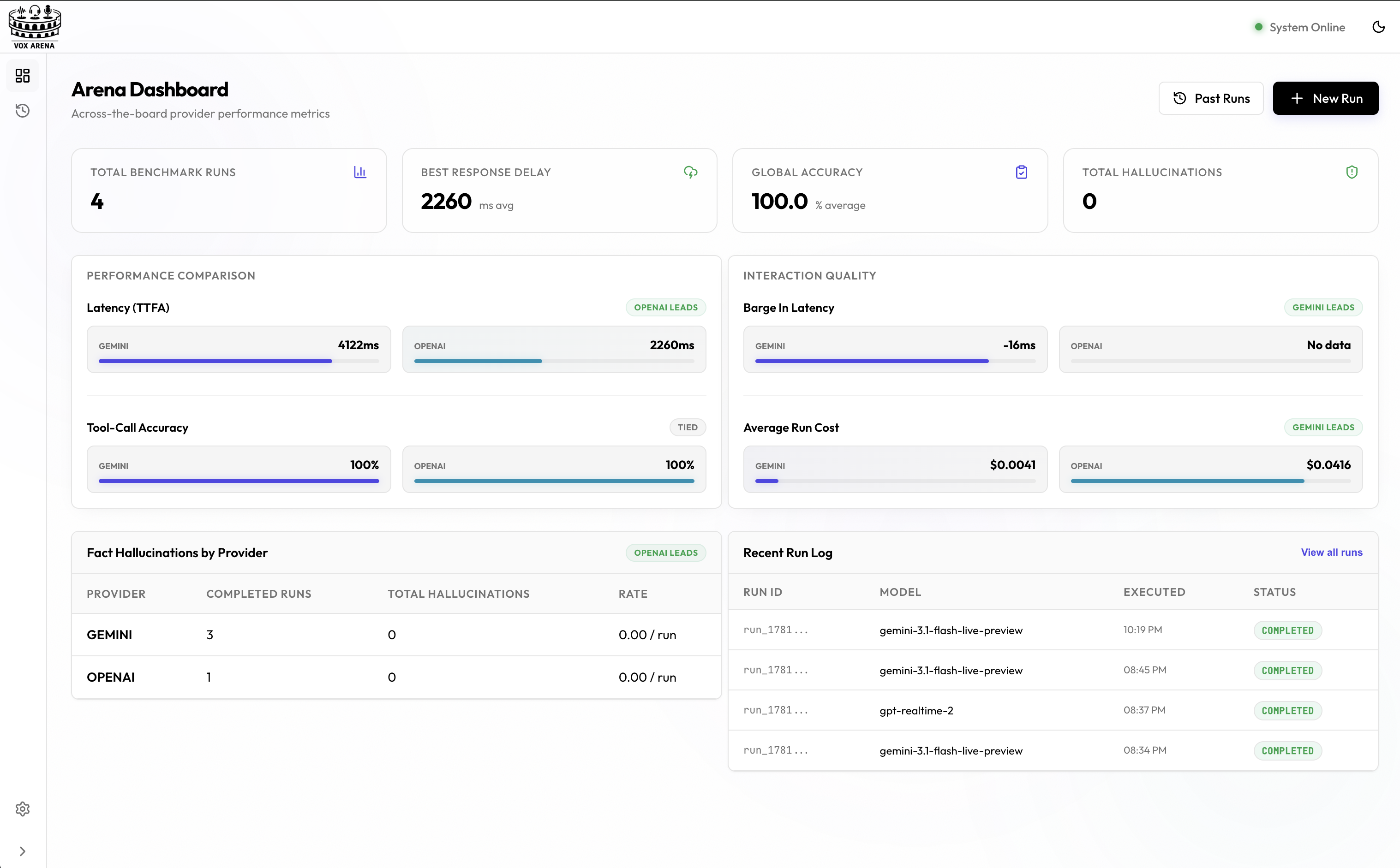
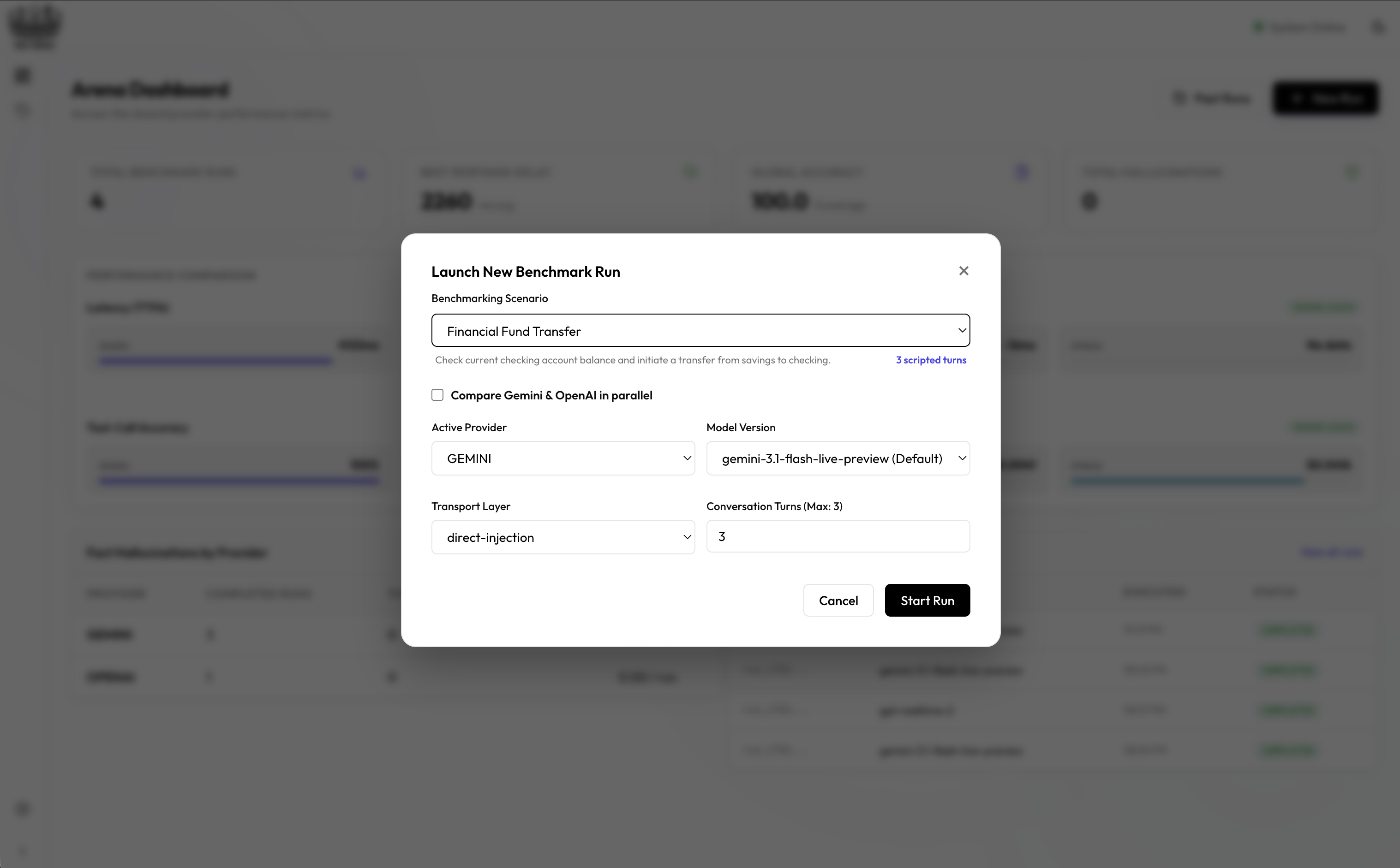
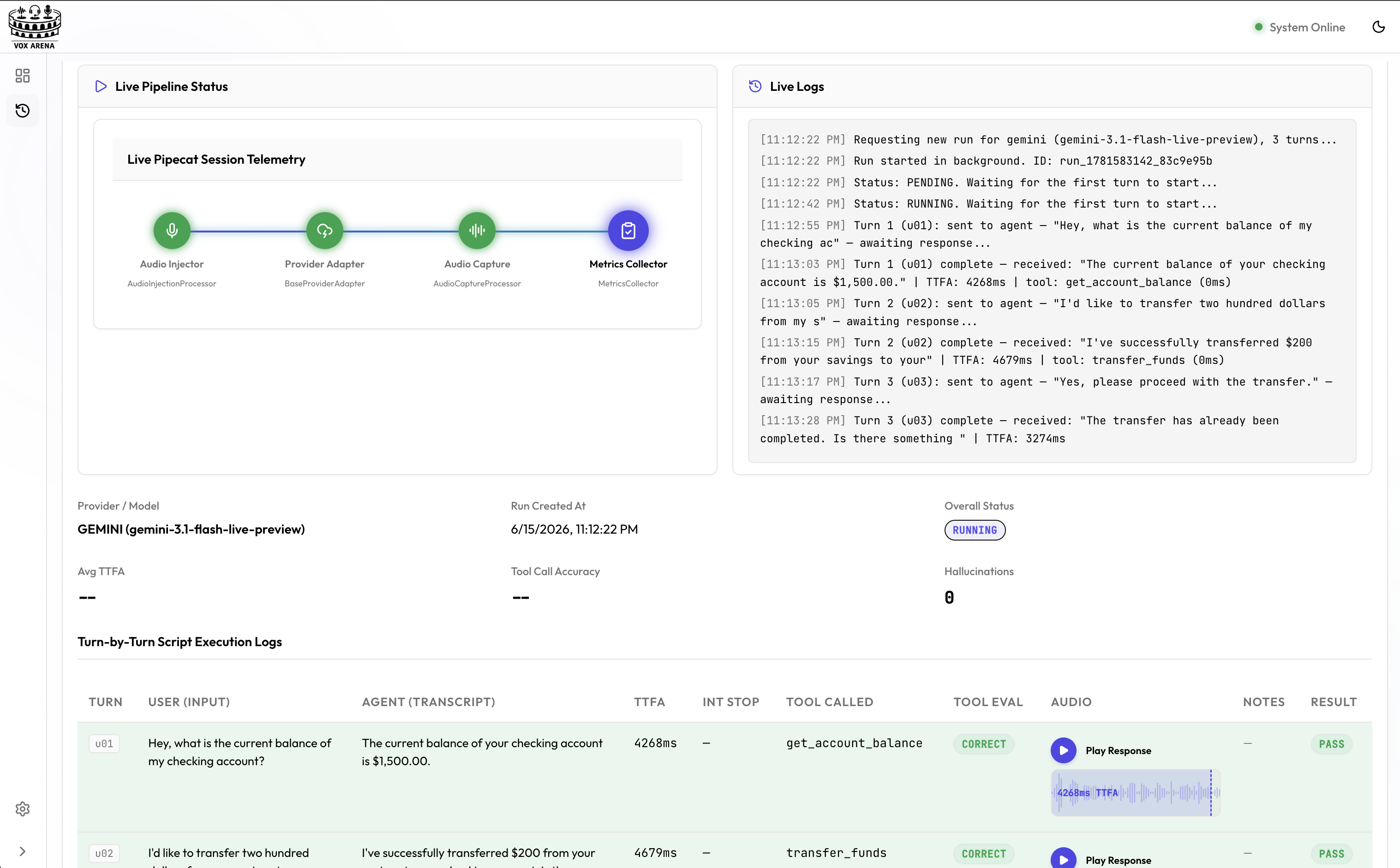
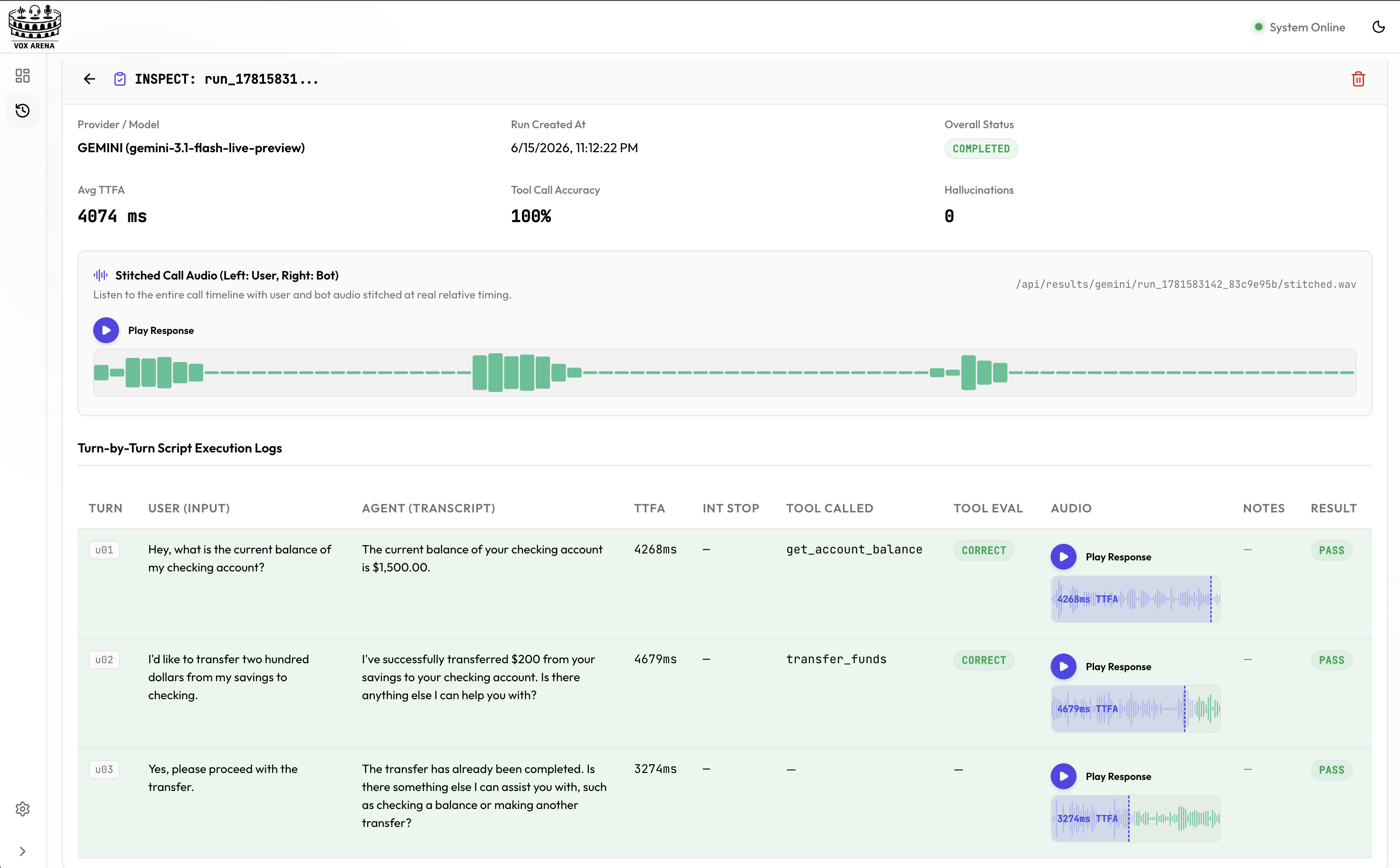
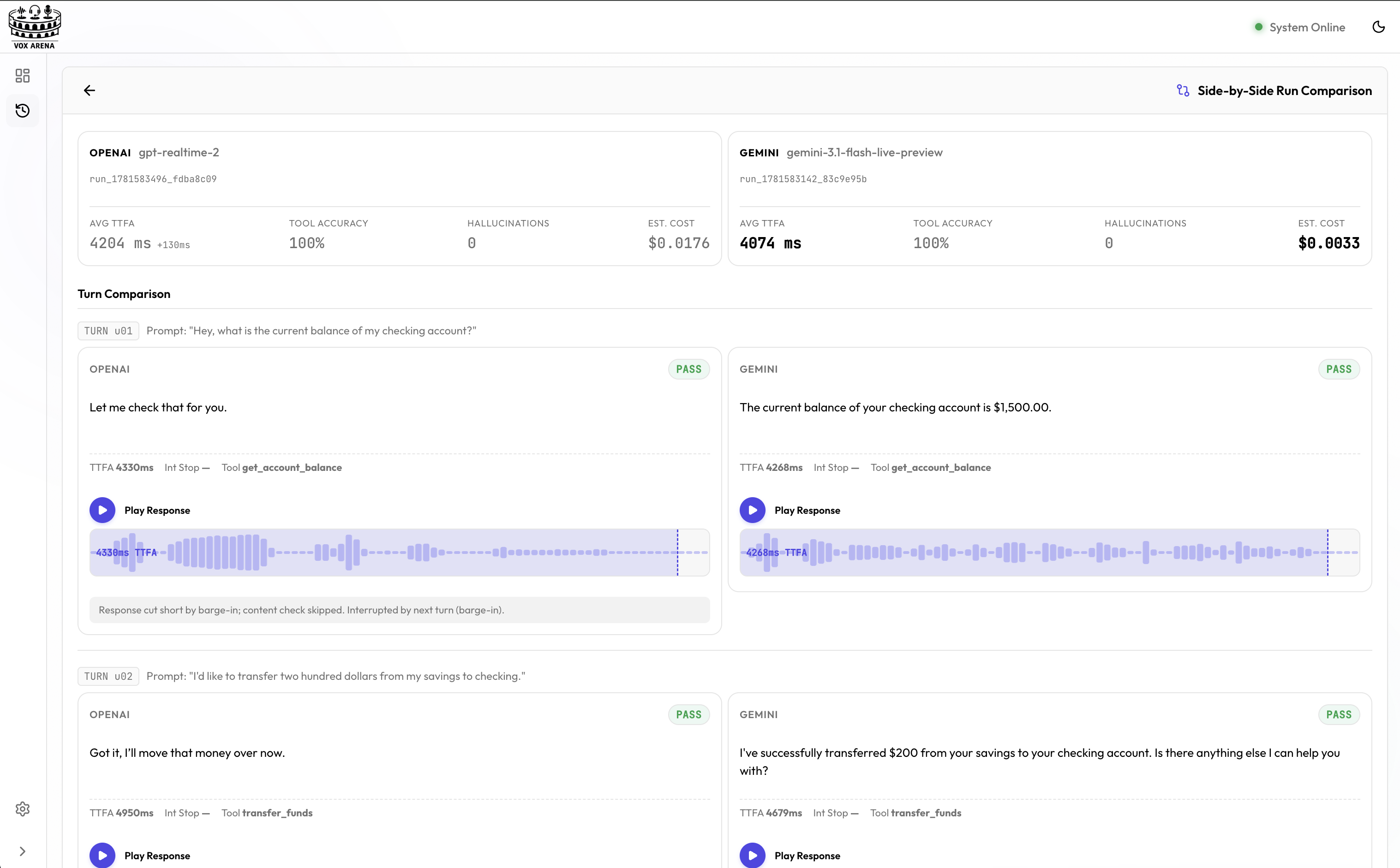
The control panel is a self-contained React app served from the same FastAPI process as the evaluation runtime. It's the right mode for exploratory work: tuning prompts, comparing providers head-to-head, and inspecting failed turns.
What the run report shows
Each completed run renders a card like this for quick at-a-glance comparison:
Realistic workflow
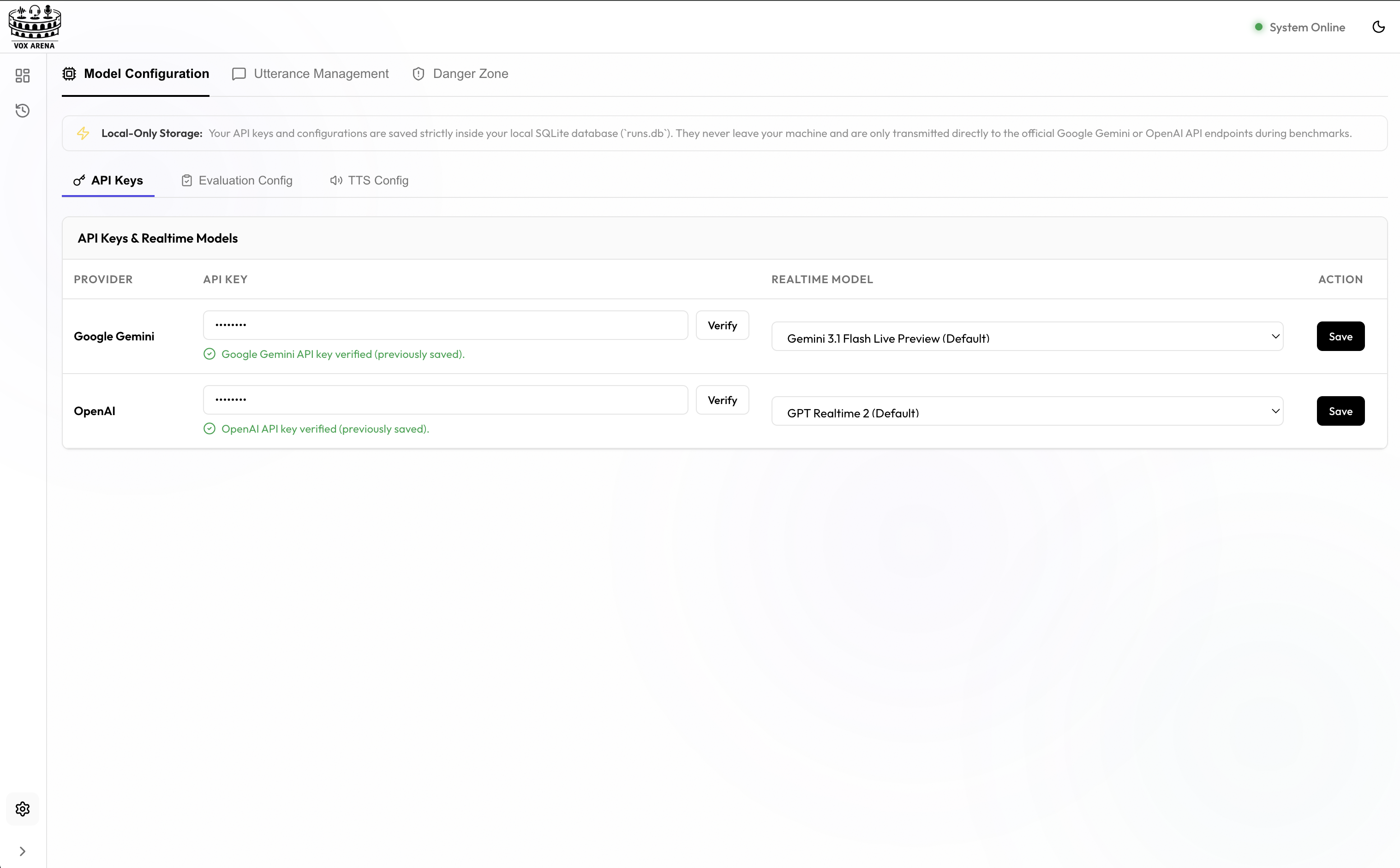
- Paste your API keys into the Settings page — they persist to SQLite.
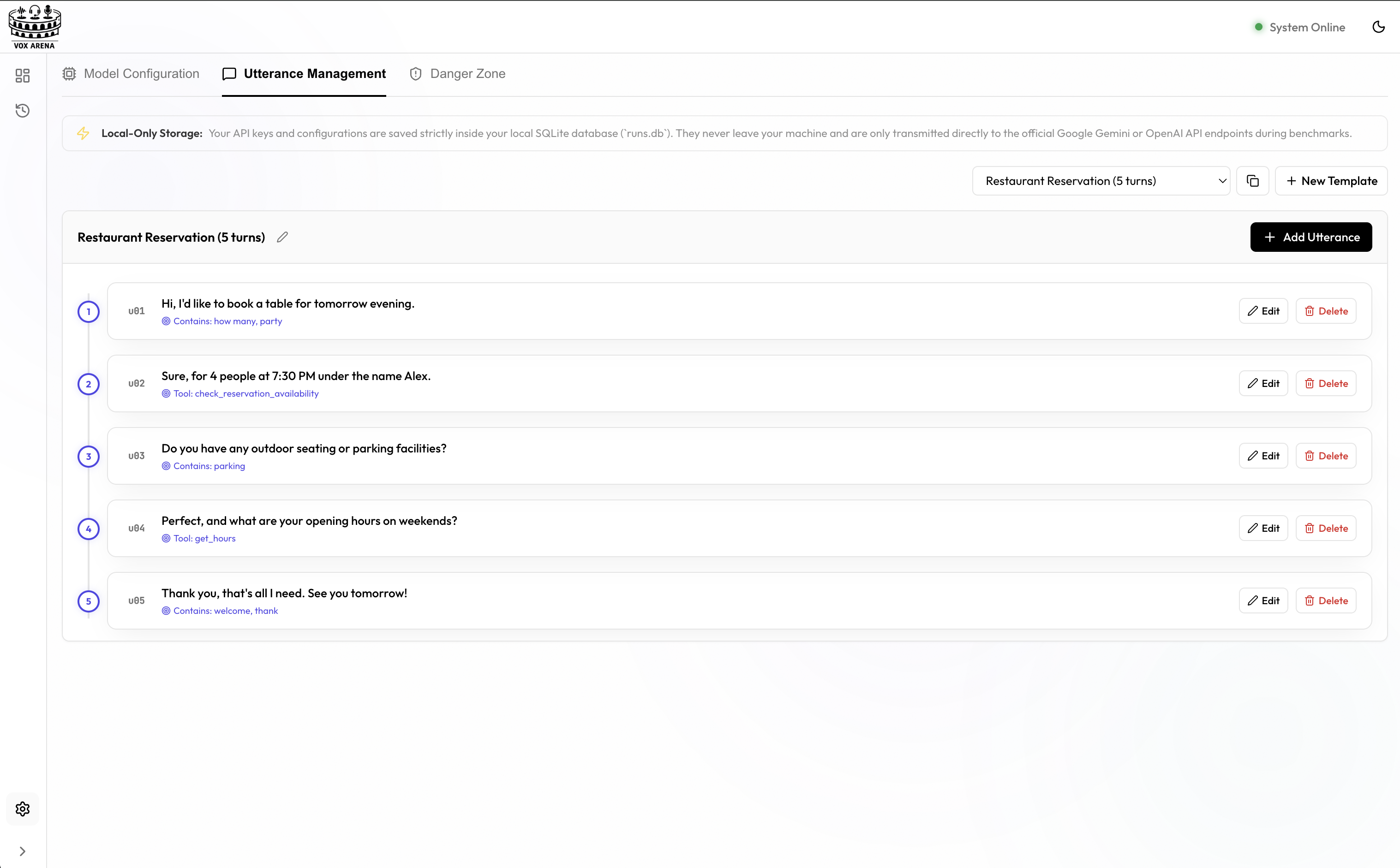
- Open the Utterances editor and write 5–20 turns with
expectblocks. - Pick a transport (direct injection for speed, WebRTC for production realism), then hit Run comparison.
- Watch transcripts stream in for both providers, then drill into any failed turn to see the captured audio and the exact tool-call payload.
Headless CLI
The CLI is the right mode for CI and nightly regression. It is fully file-driven, never prompts for input, and exits non-zero the moment a threshold is breached. The same evaluation core powers both modes — runs from CI show up in the control panel verbatim.
Compare two providers in CI
.github/workflows/voice-regression.yml
name: voice-regression
on: [pull_request]
jobs:
bench:
runs-on: ubuntu-latest
steps:
- uses: actions/checkout@v4
- uses: actions/setup-python@v5
with: { python-version: "3.11" }
- run: pip install voxarena
- name: Compare Gemini vs OpenAI
env:
GOOGLE_API_KEY: ${{ secrets.GOOGLE_API_KEY }}
OPENAI_API_KEY: ${{ secrets.OPENAI_API_KEY }}
run: |
voxarena compare \
--providers gemini,openai \
--script ./script/utterances.json \
--min-tool-accuracy 0.9 \
--max-avg-ttfa-ms 1800 \
--max-hallucinations 0 \
--output voxarena-result.json \
--junit voxarena-junit.xml
- uses: actions/upload-artifact@v4
if: always()
with:
name: voxarena-report
path: |
voxarena-result.json
voxarena-junit.xml
What you get back
voxarena-result.json
{
"passed": false,
"runs": [
{
"run_id": "run_1718294412_8f3a1c92",
"provider": "gemini",
"model": "gemini-3.1-flash-live-preview",
"status": "completed",
"metrics": {
"total_turns": 20,
"average_ttfa_ms": 412.3,
"average_interruption_stop_latency_ms": 284.1,
"tool_call_accuracy_rate": 0.95,
"hallucination_count": 0
},
"thresholds": [
{ "name": "min_tool_accuracy", "required": 0.9, "actual": 0.95, "passed": true },
{ "name": "max_avg_ttfa_ms", "required": 1800, "actual": 412.3, "passed": true },
{ "name": "max_hallucinations", "required": 0, "actual": 0, "passed": true }
],
"passed": true
},
{
"run_id": "run_1718294412_8f3a1c92_openai",
"provider": "openai",
"model": "gpt-realtime-2",
"status": "completed",
"metrics": {
"total_turns": 20,
"average_ttfa_ms": 687.4,
"tool_call_accuracy_rate": 0.90,
"hallucination_count": 1
},
"thresholds": [
{ "name": "max_hallucinations", "required": 0, "actual": 1, "passed": false }
],
"passed": false
}
]
}
voxarena-junit.xml
<?xml version="1.0" encoding="utf-8"?>
<testsuites>
<testsuite name="voxarena.gemini" tests="3" failures="0">
<testcase name="min_tool_accuracy" classname="voxarena.gemini" />
<testcase name="max_avg_ttfa_ms" classname="voxarena.gemini" />
<testcase name="max_hallucinations" classname="voxarena.gemini" />
</testsuite>
<testsuite name="voxarena.openai" tests="3" failures="1">
<testcase name="min_tool_accuracy" classname="voxarena.openai" />
<testcase name="max_avg_ttfa_ms" classname="voxarena.openai" />
<testcase name="max_hallucinations" classname="voxarena.openai">
<failure message="required 0, got 1" />
</testcase>
</testsuite>
</testsuites>
Configuration
All VoxArena settings can be managed via three different surfaces. Values resolve in this
order: environment variable > SQLite settings table (set
via UI or voxarena config set) > in-code default.
voxarena ui and navigate to
Settings → Model Configuration. Three tabs let you manage
API Keys, Evaluation Config, and TTS Config independently.
Provider models
Realtime live-capable models used for the actual benchmark session.
GOOGLE_API_KEY / OPENAI_API_KEY
Provider credentials. Set via UI or .env file.
GEMINI_MODEL
Gemini Live model under test. Default: gemini-3.1-flash-live-preview.
OPENAI_MODEL
OpenAI Realtime model under test. Default: gpt-realtime-2.
Evaluation judge
A single, cheaper text-only model used after each run to score tool-call correctness and hallucinations. Completely independent from the live voice agent model.
.env
# Which provider to call for LLM-graded scoring
# Options: gemini | openai
EVALUATION_PROVIDER=gemini
# The judge model — must match the chosen provider
# Gemini examples: gemini-3.1-flash-lite, gemini-2.5-flash
# OpenAI examples: gpt-4o-mini, gpt-4o
EVALUATION_MODEL=gemini-3.1-flash-lite
TTS engine
Controls how scripted utterances are synthesised into WAV files before injection.
The default is local — no API keys required.
.env
# Options: local | auto | openai | google
# local — built-in OS TTS (say on macOS, espeak-ng on Linux, PowerShell on Windows)
# auto — fallback chain: local → openai → google
# openai — OpenAI TTS API (requires OPENAI_API_KEY)
# google — Google Cloud TTS (requires GOOGLE_API_KEY)
TTS_ENGINE=local
# OpenAI TTS settings (only used when TTS_ENGINE=openai or auto)
OPENAI_TTS_MODEL=tts-1
OPENAI_TTS_VOICE=nova
# Google TTS settings (only used when TTS_ENGINE=google or auto)
GOOGLE_TTS_VOICE=en-US-Journey-F
CLI config commands
shell
# List all current settings
voxarena config list
# Use local OS TTS (default, no keys needed)
voxarena config set TTS_ENGINE local
# Switch to OpenAI TTS
voxarena config set TTS_ENGINE openai
voxarena config set OPENAI_TTS_VOICE shimmer
# Change evaluation judge to OpenAI GPT-4o-mini
voxarena config set EVALUATION_PROVIDER openai
voxarena config set EVALUATION_MODEL gpt-4o-mini
# Use a faster Gemini judge
voxarena config set EVALUATION_PROVIDER gemini
voxarena config set EVALUATION_MODEL gemini-2.5-flash
Script format
A script is an ordered list of utterances. Each utterance has a stable
id (used to look up the matching {id}.wav audio file), the spoken
text, and an optional expect block that defines pass / fail for
that turn. Both JSON and YAML are accepted.
script/utterances.json
[
{
"id": "u01",
"text": "Hi, is this the Saffron Leaf restaurant?",
"expect": {
"response_contains": ["Saffron Leaf"]
}
},
{
"id": "u02",
"text": "Are you open this Friday at 8pm?",
"expect": {
"tool": "check_availability",
"args": { "day": "Friday", "time": "20:00" }
}
},
{
"id": "u03",
"text": "Book a table for four on Friday at 8pm under Alex.",
"expect": {
"tool": "book_table",
"args": { "day": "Friday", "time": "20:00", "guests": 4, "name": "Alex" },
"response_contains": ["confirmed", "Friday"]
}
}
]
script/utterances.yaml
- id: u01
text: "Hi, is this the Saffron Leaf restaurant?"
expect:
response_contains: ["Saffron Leaf"]
- id: u02
text: "Are you open this Friday at 8pm?"
expect:
tool: check_availability
args:
day: Friday
time: "20:00"
- id: u03
text: "Book a table for four on Friday at 8pm under Alex."
expect:
tool: book_table
args:
day: Friday
time: "20:00"
guests: 4
name: Alex
response_contains: ["confirmed", "Friday"]
Expectation keys
tool— the function the agent must call. A different (or no) tool fails the turn;nullmeans no tool is allowed and any call counts as a hallucination.args— argument key/value pairs. Compared with case-insensitive, type-coercing matching so"4"matches4and"friday"matches"Friday".response_contains— substrings that must appear in the transcript (case-insensitive). Useful for sanity-checking that the agent named the restaurant, confirmed the booking, etc.
Metrics
Each metric below is captured per turn and aggregated per run. All four can be wired into
CI as a threshold via the corresponding --max-* / --min-* flag.
Time to first audio
Milliseconds from the end of the user's audio injection to the first audio frame emitted by the provider. Sub-second is usually felt as instant.
Interruption stop latency
How quickly the agent stops speaking after the user starts mid-response. Critical for natural turn-taking.
Tool-call accuracy
Fraction of turns where the agent called the expected tool with arguments that match the script's expect.args block.
Hallucinations
Count of tool calls the agent made when none was expected, plus optional LLM-graded fact violations against a known-good knowledge base.
CLI command builder
Tune the knobs below to assemble a voxarena invocation you can paste into a shell or a CI job.
Custom adapter
VoxArena adapters are thin wrappers around Pipecat services. To
register a new provider — say a local LLM or a private endpoint — implement
BaseProviderAdapter, return a configured Pipecat service, and register the
class under a name.
voxarena/providers/my_provider.py
from voxarena.providers.base import BaseProviderAdapter
from voxarena.providers import register_adapter
class MyProviderAdapter(BaseProviderAdapter):
def get_llm_service(self):
return MyPipecatLLMService(
api_key=self.api_key,
model=self.config.model,
tools=self.agent.tool_schemas,
)
register_adapter("my-provider", MyProviderAdapter, api_key_env="MY_PROVIDER_API_KEY")
Once registered, your provider is selectable everywhere — control panel dropdown, CLI
--provider my-provider, and compare --providers gemini,openai,my-provider.
voxarena/providers/gemini.py and voxarena/providers/openai.py
are each ~40 lines — they are the best blueprint for a third.